Slack · UX Research · 2026
Studying what happens when work, messages, and 67 unread notifications collide.
Role
UX Researcher
Team
Brayden, Bess, Finley, Yu Dian
Duration
10 Weeks
Year
2026
The Project
Making workplace communication easier to understand.
Slack is one of the most widely used workplace communication tools, but many of its most important features are hidden behind unclear terminology, fragmented navigation, and invisible system states. This project evaluated Slack through heuristic analysis, moderated usability testing, redesign, and validation testing to uncover where users struggle and how targeted design changes could improve task success.
My Role
I led research synthesis, usability testing, and participant analysis. I helped identify high-severity usability issues, translate findings into redesign concepts, and validate solutions through a second round of testing.
The Problem
Slack hides its own state.
When users need to find saved information, understand why they are receiving notifications, or navigate a new workspace, they often believe they completed tasks successfully when they actually failed. Slack frequently failed to communicate where information lived, what actions did, and whether a task was completed.
The result was false confidence, confusion, and wasted time. Users were finishing tasks wrong and had no idea.
Process
Four stages from evaluation to validation.
We followed a full research-to-validation loop. Heuristic findings shaped what we tested in moderated sessions. Moderated failures shaped what we redesigned. Redesigns were validated with a fresh cohort through UserTesting.com.
Heuristic Evaluation
Reviewed 12 Slack workflows against Nielsen's 10 heuristics to identify usability issues before involving any participants
Moderated Testing
Defined test scenarios based on heuristic findings, then ran 8 participants through structured tasks on the current Slack interface with a facilitator present
Designing Changes
Used moderated session failures to create targeted prototypes addressing the two highest-severity issues found in testing
Unmoderated Validation
Deployed redesigns to 8 new participants via UserTesting.com to confirm improvements held up without a facilitator present
Heuristic Evaluation
12 workflows. Four recurring themes.
Before running any user tests, we evaluated 12 Slack workflows against Nielsen's 10 usability heuristics. Four themes emerged consistently across almost every workflow.
Visibility Breaks Down
Critical system state was hidden or absent at the moments users needed it most
Weak or Missing Feedback
Actions completed without confirmation, leaving users uncertain whether anything happened
Fragmented Navigation
Related settings were split across multiple menus with no clear path between them
Workflow Friction
Simple tasks required more steps than expected, creating consistent drop-off patterns
This is a more dangerous failure mode than simple confusion. When the interface gives users false confidence, they stop looking for the right answer.
Moderated Testing
Three tasks. Two major failures. One root cause.
Eight participants completed three structured tasks with the original Slack interface. Task 1 passed. Tasks 2 and 3 revealed the core issues that would drive the redesign.
Moderated Results — original Slack
| ID | Task 1: Navigation | Task 2: Message Retrieval | Task 3: Notifications |
|---|---|---|---|
| P1 | Sent a message | Identified Ethan's message | Failed to adjust notifications |
| P2 | Sent a message | Did not identify Ethan's message | Went to account notification settings |
| P3 | Sent a message | Did not identify Ethan's message | Failed to adjust notifications |
| P4 | Sent a message | Did not identify Ethan's message | Failed to adjust notifications |
| P5 | Sent a message | Identified Ethan's message | Failed to adjust notifications |
| P6 | Sent a message | Did not identify Ethan's message | Went to account notification settings |
| P7 | Sent a message | Did not identify Ethan's message | Failed to adjust notifications |
| P8 | Sent a message | Identified Ethan's message | Failed to adjust notifications |
Navigation and Orientation
"Find where your team is communicating and introduce yourself."
Moderated
8/8
Users immediately understood Slack's channel structure. The layout matched their existing mental models of workplace communication tools.
Ohhh Slack. I feel comfy here.
Navigation worked because it met expectations. When Slack matches how users already think, it is invisible in the best way.
Message Retrieval
"Find the message your manager saved for you."
Moderated
3/8
Severity
4/4
Users could not distinguish between Saved, Pinned, and Later. Most searched multiple locations before giving up or accepting an incorrect result.
There is usually a saved button here. This is terribly confusing.
Users understood saving as a concept but Slack's implementation did not match. The terminology and location were both misaligned with expectations.
Notification Prioritization
"Figure out why you are receiving notifications and update your settings."
Moderated
2/8
Severity
4/4
Notification settings were spread across at least three separate menus. Users could not determine what settings were active, why notifications appeared, or where the controls lived.
I have no idea where to even start with this.
Critical system state was hidden. Users needed to know what was happening before they could change it, and Slack never told them.
Designing Changes
Two targeted solutions built from testing failures.
Both redesigns targeted the same underlying problem: Slack was not communicating what it was doing. Click any image to expand it.
Redesign 01
Save For Me and Pin For Everyone
We modified the UX writing of the pin and save options to use clearer, action-oriented language: Save for Me for personal content, and Pin for All for channel-wide visibility.
Before
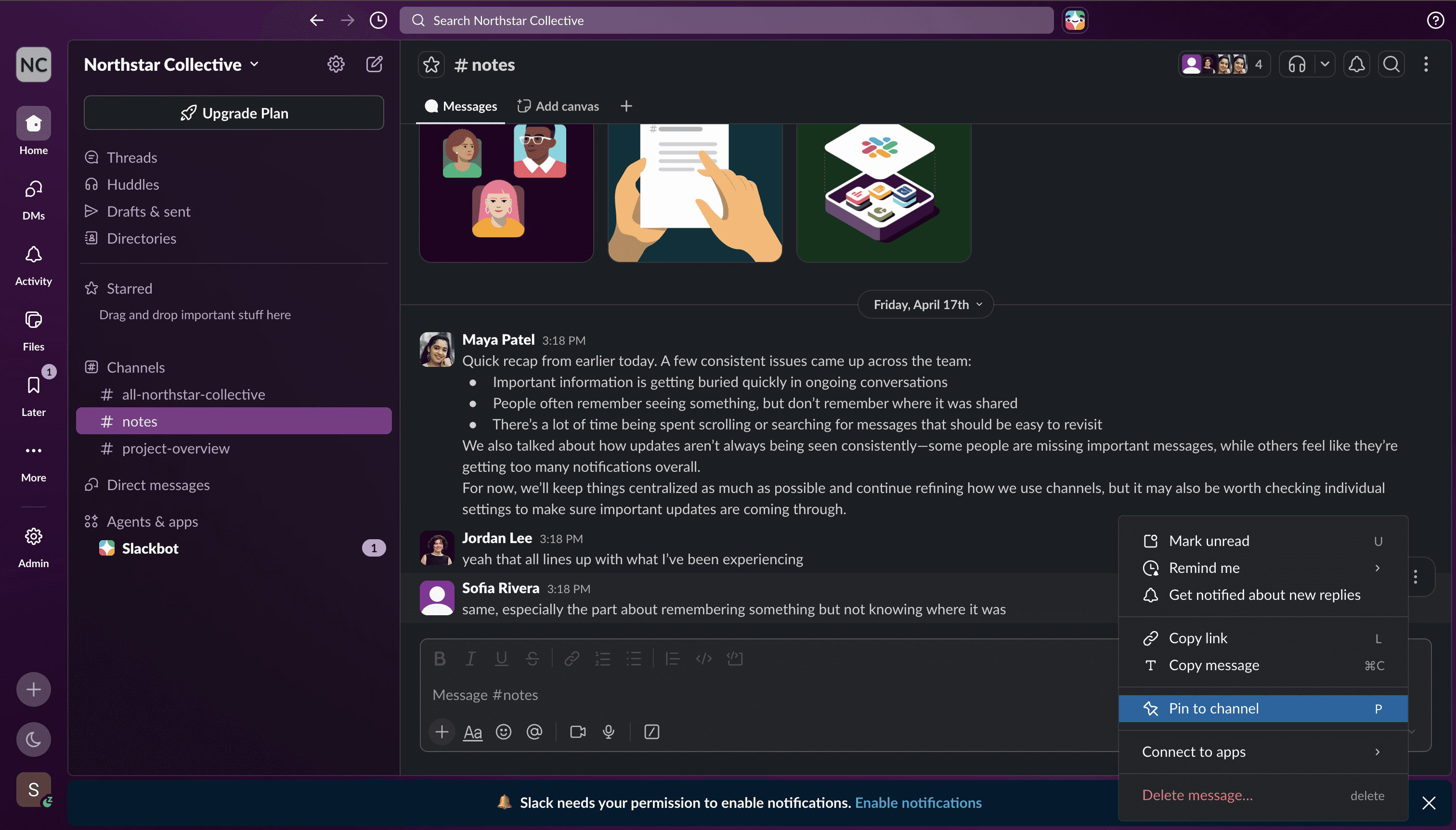
Saved, Pinned, and Later with no clear distinction of ownership or visibility
After
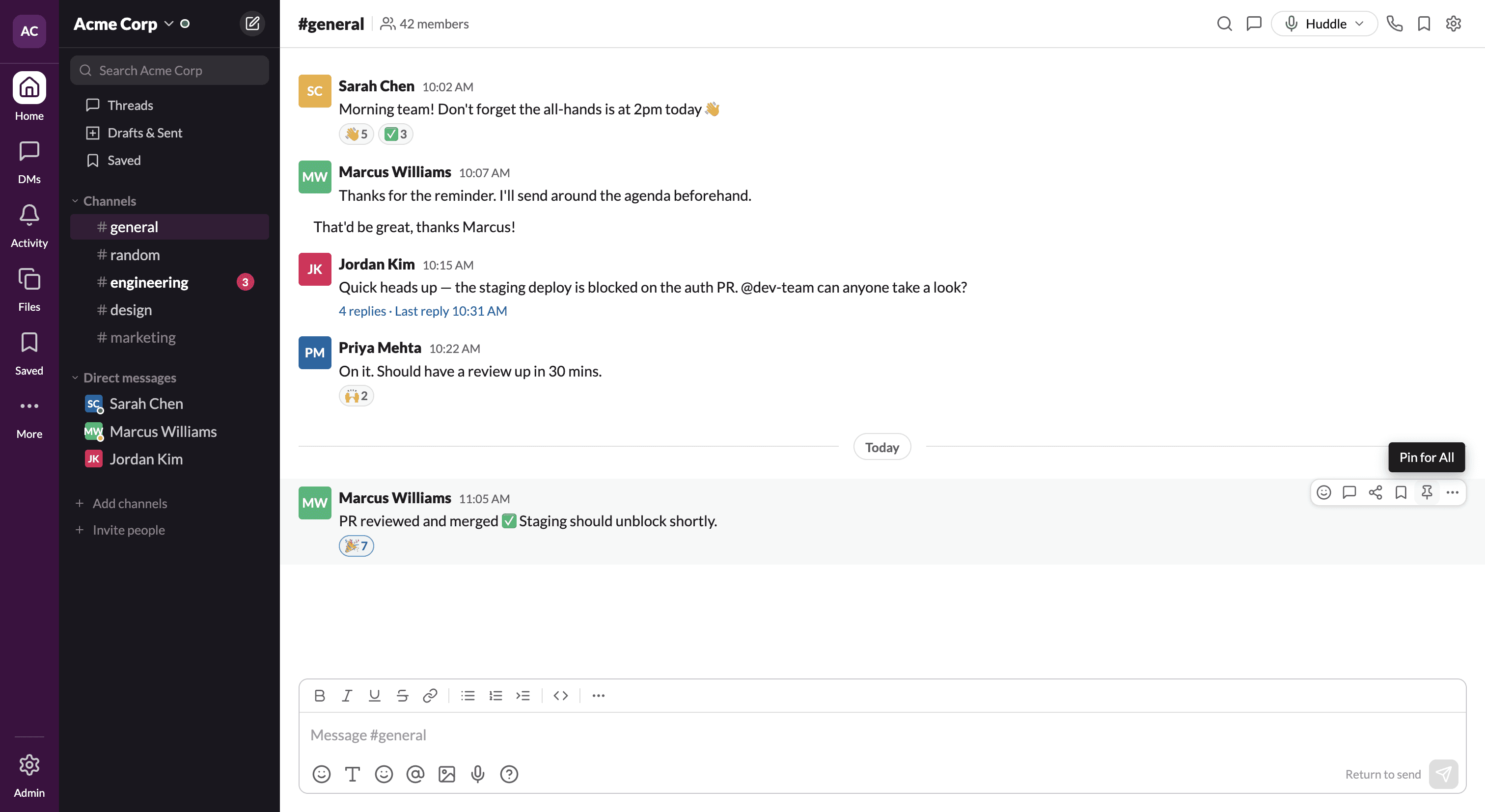
Save for Me and Pin for All make the action personal vs. shared at a glance
Redesign 02
Unified Notification Center
A persistent notification status bubble and centralized settings panel replaced three separate menus. Users can now see what is active and change it from one place.
Before
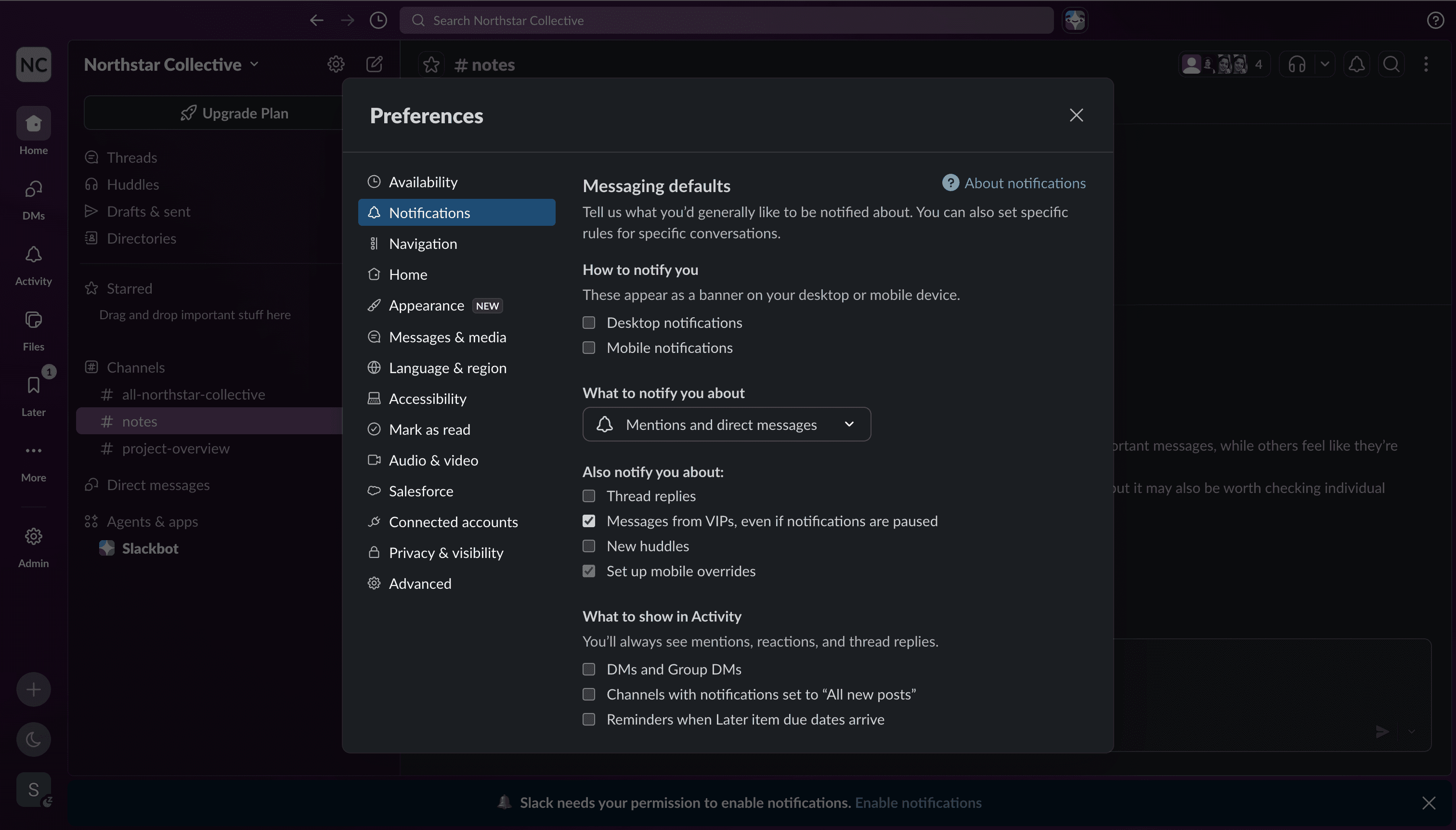
Notification settings buried across three menus with no visible current state
After
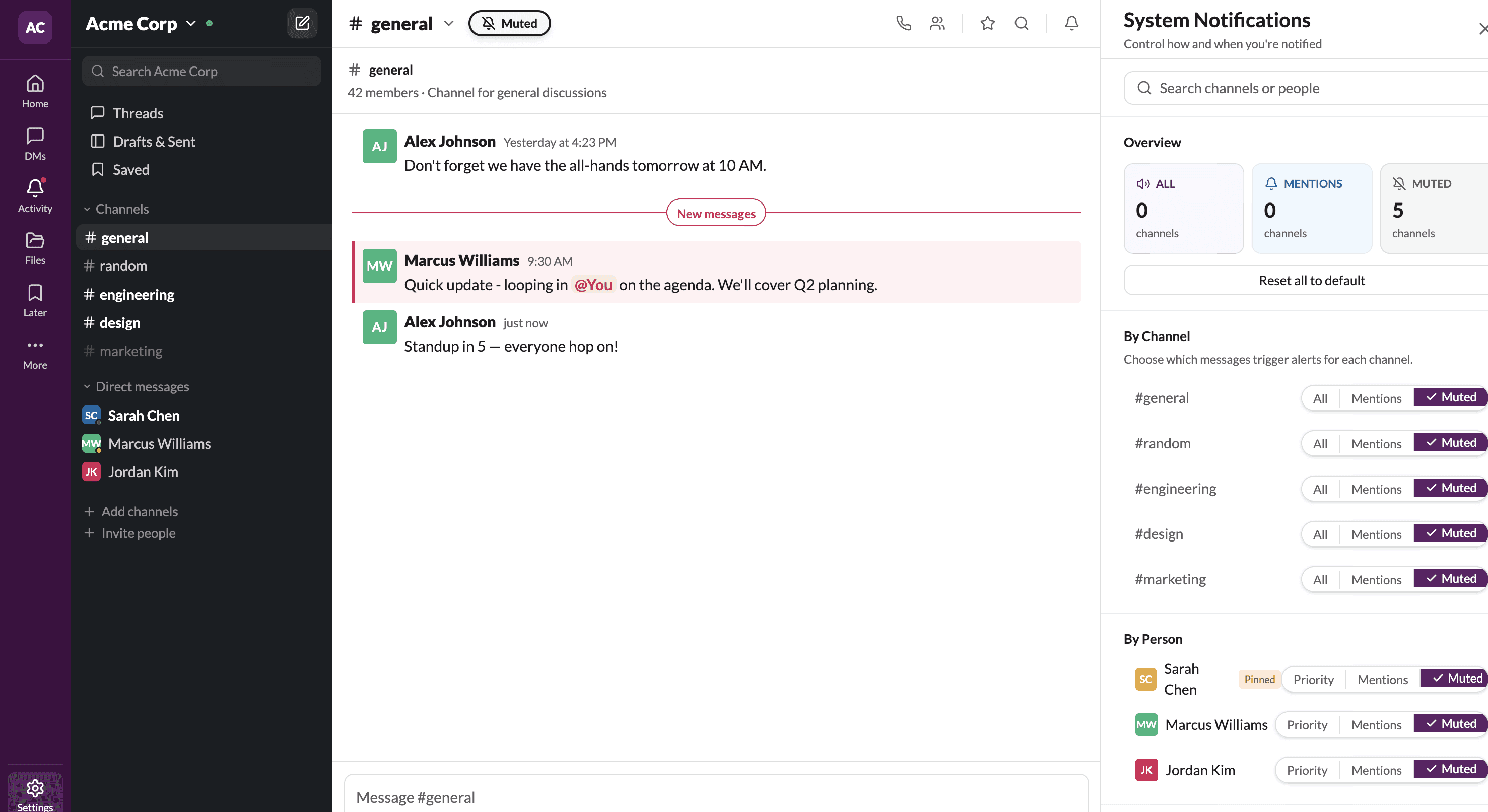
Persistent status bubble per channel, global controls centralized
Unmoderated Validation
Same tasks. New cohort. Completely different results.
8 new participants tested the redesigned prototypes via UserTesting.com. The same tasks that produced major failures in the moderated session achieved 100% success.
Unmoderated Results — after redesign via UserTesting.com
| ID | Task 1: Navigation | Task 2: Message Retrieval | Task 3: Notifications |
|---|---|---|---|
| P2 | Completed, 5 | Completed, went to Later tab | Completed, 4 |
| P3 | Complete | Completed, very easy | Completed, a little confused |
| P4 | Complete, 4 | Completed, 4 | Completed, 4 |
| P5 | Complete, 5 | Complete, 5 | Complete |
| P6 | Complete, 5 | Complete, 5 | Completed |
| P7 | Completed, 4 | Complete, 5 | Completed |
| P8 | Completed, 5 | Completed, 5 | N/A |
| P9 | Completed, 5 | Completed, 5 | Complete, 4 |
37.5%
100%
Message retrieval success after redesign
25%
100%
Notification management success after redesign
Business Value
Why this matters beyond the test session.
Slack is used hundreds of times per day. When core features are too confusing to use correctly, the cost is not one failed task in a lab. It is every employee, every day, slightly less productive than they should be.
Productivity up
When users can find information and trust system feedback, they spend less time searching and more time doing actual work.
Support load down
Confused users become support tickets. Clear interfaces reduce the volume of questions that reach IT and operations teams.
Feature adoption up
Features users cannot find are features that do not exist for them. Better visibility drives genuine usage across the organization.
Onboarding faster
New team members get productive faster when the tool communicates clearly. Every week of confusion has a measurable cost.
Good communication tools should not make users guess. Visibility creates confidence, and confidence creates efficiency.
The Outcome
Clear systems create confident users.
Before the redesigns, users regularly believed they completed tasks when they had not. After: users could locate saved information, understand notification settings, and complete tasks without confusion. Both severity-4 issues went from near-complete failure to 100% task success.
37.5%
100%
Message retrieval success
25%
100%
Notification management success
More work
Slack
Fixing what users can't find
You are here
Let's work together